Blog

Writing on AI engineering, software architecture, and leadership.

.Net Aspire Preview 2 with Dapr and the secretstore

Development.Net

In my recent SaaS personal projects, I’ve been exploring the capabilities of Dapr, based off of the eShopOnDapr sample. Dapr, with its integrated APIs and best practices for building distributed applications, has significantly streamlined my development process. Learn more about Dapr.

I’ve also been incorporating architectural insights and best practices from YouTube channels like Milan Jovanovic, Nick Chapsas, and Codewrinkles. Their guidance has refinined my approach to these solutions especially around using MediatR, Vertical Slice architecture and performance. Check out their insights:

The release of .NET 8 introduced the .NET Aspire 8.0 Preview 1 - an opinionated, cloud-ready stack ideal for building observable, production-ready, distributed applications compatible with Dapr. View .NET Aspire on GitHub.

Integrating .NET Aspire into my projects was pretty straightforward. However, I encountered a few challenges, especially with Dapr configuration management across projects. I ended up copying the dapr config files into each projects. Aslo .NET Aspire Preview 1 lacked support for deploying Dapr components to Azure.

With the advent of Preview 2, which impoves supports Dapr, I successfully updated my projects. However, I faced a challenge with the secret store configuration:

var secretStore = builder.AddDaprComponent("gab-secretstore", "secretstores", new
    DaprComponentOptions { LocalPath = "../dapr/components/" });

var apiService = builder.AddProject<Projects.gabMileage_Mileage_Api>("mileage-api")
    .WithDaprSidecar()
    .WithReference(secretStore);

This code snippet illustrates how Preview 2 allows specifying Dapr file locations, which was a game-changer in maintaining a centralized configuration. An initial oversight of omitting the trailing slash in the path led to a frustrating error “secret store is not configured”. In reviewing the logs of the Dapr sidecare revealed that the secretstore was not being loaded. Doing some debugging with the Aspire source provided the much-needed insight. Looking at the command line in the Aspire Dashboard showed that the resources path ommited the /component part of the path.

...
foreach (var componentReferenceAnnotation in componentReferenceAnnotations)
{
if (componentReferenceAnnotation.Component.Options?.LocalPath is not null)
{
var localPathDirectory = Path.GetDirectoryName(NormalizePath(componentReferenceAnnotation.Component.Options.LocalPath));

        if (localPathDirectory is not null)
        {
            aggregateResourcesPaths.Add(localPathDirectory);
        }
    }
    else if (onDemandResourcesPaths.TryGetValue(componentReferenceAnnotation.Component.Name, out var onDemandResourcesPath))
    {
        string onDemandResourcesPathDirectory = Path.GetDirectoryName(onDemandResourcesPath)!;

        if (onDemandResourcesPathDirectory is not null)
        {
            aggregateResourcesPaths.Add(onDemandResourcesPathDirectory);
        }
    }

}
...

I’m currently developing a simplified version of these projects to experiment with new ideas before integrating them into production projects. You’re welcome to check out the progress and contribute your insights on my personal GitHub repository.

My journey with Dapr and .NET Aspire continues to be a learning curve. I’m excited to see how these tools evolve and how they can further enhance SaaS project development.

Learning Current Angular Tool Best Practices

DevelopmentAngular

Over the last couple of weeks I have been diving back into Angular development using Angular 6 and ngrx.  One of the things that quickly became apparent is that now the best practices of installing JavaScript tools is to install them locally instead of globally to prevent version collisions.

When I first started I installed the angular cli globally and encountered this type of error when running many of the sample apps that I downloaded.

Your global Angular CLI version (6.0.8) is greater than your local version (1.7.3). The local Angular CLI version is used.

This didn’t seem to cause me an issues but still the error bugged me and when I was reading the book Angular 6 for Enterprise-Ready Web Applications by Doguhan Uluca he really drives home that you should keep the number of globally installed packages to a minimum.

I was able to find out what commands I had installed globally using this command

npm list -g --depth=0

Which showed I only had the angular cli and npm install globally.

So I was able to uninstall the global angular cli and get rid to the ugly warnings.

Doguhan also points our that you should use npm-windows-upgrade instead of using npm i -g npm to upgrade npm on Windows or you are going to run into npm corruption issues.

https://github.com/felixrieseberg/npm-windows-upgrade

Random Stuff I want to remember

Random

Windows 10 Home password expiration.

Today I had a couple of Windows 10 Home machines had their passwords expire.

To turn off the Windows 10 password expiration

net accounts /maxpwage:0

From http://www.thewindowsclub.com/customizing-the-password-policy-in-windows-7

Upgrading npm on Windows

I was installing jspm on a new machine and after I installed node 4.3.1 it was running npm I was trying to upgrade npm.  I tried a bunch of different commands I found on stack overflow but this command from the npm site (I feel like Colonel Sanders looking for the Nashville Hot Chicken Recipe) did the trick on both Windows and the Mac.

npm install npm@latest –g

From*:* https://docs.npmjs.com/getting-started/installing-node

http-server

In my recent javascript library/framework exploration I found myself needing a quick way to server html without having to have gulp or more permanent web server.  I found http-server fits the bill nicely.

npm install –g http-server

http-server –o –c-1

-o opens browser window after starting the server

-c-1 disables caching

From: https://github.com/indexzero/http-server

VisualStudio Code fix for icons not appearing

Development

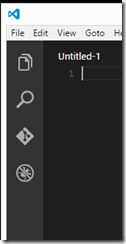
When VisualStudio code was announced I went out and installed it right away on my Mac and Windows machines.  One my home development machine I was unable to see the icons.  I was thinking that it was due to my 4K display and an High DPI issue but it turns out not to be the case.

image

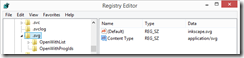
In reading the Reacting to feedback, common issues, and our first update post on the Visual Studio Code bug it was due to the svg file extension being associated to something other than image/svg+xml in my case due to Inkscape it was set to application/svg.

image

Changing the Content Type to image/svg+xml made the icons visible.

image

There is a FAQ with several fixes and workarounds for Visual Studio Code at https://code.visualstudio.com/Docs/FAQ

Chocolatey Kickstarter Funded! A list of my current packages

DevelopmentSoftware

The third (second successful) Kickstarter campaign that I pledged to the Chocolatey Kickstarter campaign was successfully funded.  I always like reading what tools other developers are using so to celebrate, I thought I would publish the packages I currently have installed.

I may have an issue with being obsessed with editors.

Editors

Atom Cross platform editor from github. The official Windows installation is delivered via Chocolatey.
linqpad4.install LinqPad essential editor for working with Linq and C# snippits.  It will be interesting to see if scriptcs can be integrated
SublimeText3.app SublimeText3 my goto text editor.  This package includes Package Control
SublimeText3.PowershellAlias Installs a powershell subl alias for sublimtetext
vim Still trying to grok vim.  Probably still resent it from the late 80s.
brackets Adobe open source editor.  Designed for web design.
notepadplusplus.install Before I discovered SublimeText this was my text editor of choice.  Now I usually only use it when I have character encoding issues with files. 

Close behind my obsession with editors is my love to learn new programming languages.

Languages

erlang One of the three languages I am currently getting acquainted with.  Used in CouchDB and RabbitMQ.
golang One of the three languages I am currently getting acquainted with.
rust One of the three languages I am currently getting acquainted with.
ruby installs the current version of ruby.  Currently 2.1.3 mostly used for Sass
ruby1.9 Installs the latest 1.9 version of ruby
pik Helps manage multiple versions of Ruby on Windows
python2 Installs the latest version of python 2
python3 Installs the latest version of python 3
scriptcs Interesting REPL for C#.  Originally started by Glenn Block
pscx PowerShell Community Extensions (PSCX) is aimed at providing a widely useful set of additional cmdlets, providers, aliases, filters, functions and scripts for Windows PowerShell that members of the community have expressed interest in.
nodejs.install latest version of node

Databases

mysql Latest version of mySql
mysql.workbench Latest version of mySql Workbench
mongodb Latest version of mongodb

Programming Utilities

baretail great tool for viewing text log files on Windows
dependencywalker oldie but still necessary when trying to track down missing dependencies in c++ dlls
beyondcompare great cross platform file comparison tool
git.install Latest version of git
githubforwindows Latest github for Windows
smtp4dev Utility for capturing emails sent during development
SourceCodePro My new font of choice for code
fiddler4 Essential tool for debugging and testing web services and monitoring web traffic
InnoSetup Free tool to create setup programs
InstEd MSI editor, Better than trying to find orca

Utilities

ConEmu Great Windows console emulator.
EthanBrown.ConEmuConfig Great initial settings for ConEmuConfig
7zip.install Free file archiver with support for unpacking most compression formats
7zip.commandline command line utility for 7-zip
autohotkey.install Free open source macro creation and automation software
autoit.commandline comes with github
scite4autohotkey AutoHotkey script editor
cdburnerxp Free CD/DVD burner application.  Also lets you create Isos
crystaldiskinfo Show the health status of hard drives
winsplit Utility that is great for managing windows on a 4K display
pidgin multiple chat network client
ditto Advanced clipboard manager
dropbox I mostly use OneDrive but occasionally use dropbox
filezilla Simple and full featured ftp client.
flashplayerplugin Easy way to keep flash player updated
virtualbox latest VirtualBox install
virtualbox.extensionpack and extensions
windirstat a good way to find out where all your space went.
WindowsLiveWriter still my favorite blog editor
PreCode.WLW code formatting plugin for Windows Live Writer
sumatrapdf.install Free pdf, epub, mobi, and other ebook reader
teamviewer Great cross platform remote access program
truecrypt Free open-source disk encryption software for Windows – 7.1a
vcredist2010 Visual Studio runtime
yumi Universal multibook installer
puretext Paste text as pure text

Media Utilities

Ghostscript.app A package of apps to work with postscript files
audacity Free software for recording and editing sound files
handbrake.install A tool for converting video from nearly any format to a selection of modern, widely supported codecs.
ffmpeg Converts any media file to any other media type
paint.net Replaces most of what I use Adobe Photoshop for. 
gimp Still trying to get used to this program after all these years but since I decided to cut my Adobe Creative Cloud Subscription it works well enough for the occasions when I need more than paint.net
inkscape –pre Adobe Illustrator replacement
vlc Plays anything thrown at it

Display Collection+JSON in the browser

Development

In the last year I have become enamored with Hypermedia APIs and the Collection+JSON API in particular that I first came across in Mike Amundsen’s book Building Hypermedia APIs with HTML5 and Node.  It seems to be a perfect fit for many of the APIs that I have been working on.  Glenn Block created the CollectionJson.Net library to make it easy to create Collection+JSON based ASP.NET Web APIs.

However when I browse to a WebAPI endpoint that returns a Collection+JSON result in Internet Explorer or Firefox I get a prompt to download the file.

image

image

Chrome displays the raw JSON result in a more friendly manner.

image

Although Fiddler or the browser debug tools make it fairly easy to see the results as JSON sometimes it is convenient to see the results rendered directly in the browser.

I found an old post from Rick Strahl’s blog regarding how to display application/json.  He suggests using JSONView for Firefox and adding a registry entry for Internet Explorer.  I was able to easily tweak the Internet Explorer registry keys to handle vnd.collection+json.  Unfortunately JSONView for Firefox will not work for the application/vnd.collection+json media type. https://github.com/bhollis/jsonview/issues/7

For internet Explorer it is just a matter of changing the Content type entered in the registry from application/json to application/vnd.collection+json

Create a new application/vnd.collection+json key in:

  • HKEY_CLASSES_ROOT\MIME\Database\ContentType**application/vnd.collection+json**
  • Add a string value of CLSID with a value of {25336920-03F9-11cf-8FD0-00AA00686F13} (the CLSID for the “Browse in place” action)
  • Add a DWORD value of Encoding with a hex value of 0x00080000
[HKEY_CLASSES_ROOT\MIME\Database\Content Type\application/vnd.collection+json]
“CLSID”=”{25336920-03F9-11cf-8FD0-00AA00686F13}”
“Encoding”=hex:08,00,00,00

image

Now Collection_JSON results will display directly in Internet Explorer.

image

For Firefox it was just a matter of specifying the application to open the media type as Firefox.

image

This adds the application/vnd.collection+json media type to the Applications list in the Firefox Options dialog.

image

And now Collection+JSON results will display directly in the Firefox window.

image

This technique will work for other types of +json media types as well such as Mason (application/vnd.mason+json) and HAL (application/vnd.hal+json).

Setting an IP address using netsh instead of arp -s on Windows 8.1

Hardware

I recently had to setup many Epson TM-T88V receipt printers for a POS installation and out of the box they are configured with a static address of 192.168.192.168.  Pressing the reset button for 3 seconds prints out the status of the printer including the MAC address so I though I would just use arp –s to configure the printers but I received an error.  So after a some googling with Bing I turned up this article that pointed me to the the fact that you need to use netsh with recent versions of Windows.

First you need to get the name of the interface that the device is connected to.  Then you execute the netsh interface ipv4 add neighbors command.

netsh interface ipv4 show interfaces

Idx     Met         MTU          State                Name
---  ----------  ----------  ------------  ---------------------------
  3          10        1500  connected     Ethernet
  1          50  4294967295  connected     Loopback Pseudo-Interface 1
 63          10        1400  connected     vowire hosting
 10           5        1500  connected     vEthernet (Internal Ethernet Port Windows Phone Emulator Internal Switch)
 29          10        1500  connected     vEthernet (VirtualBox Host-Only Ethernet Adapter Virtual Switch)

netsh interface ipv4 add neighbors "Ethernet" 10.1.10.45 xx-xx-xx-xx-xx-xx

Cool Development Utility - xip.io

DevelopmentTools

I stumbled across a mention of a free service xip.io that spared developers the hassle of editing their host file for every new development web site they needed to setup. Having had to edit the host file many times this really appealed to me. So I went to find out what type of black magic enabled this.

What I found was a very simple and brilliant solution from Basecamp (formally 37signals. xip.io is a public custom dns service that given a [domain name].[ip address].xip.io returns the ip address specified.

For example

www.gabrewer.com.192.168.1.10.xip.io resolves to 192.168.1.10
dev.gabrewer.com.192.168.1.10.xip.io resolves to 192.168.1.10
dev.www.gabrewer.com.192.168.1.10.xip.io returns 192.168.1.10

Since this is a hosted service it works for all devices that have an Internet connection including tables, phones and other Internet connected devices.

I always love it when I find a nice piece of engineering that simplifies my development experience.

My first pull request - WebApiContrib.Formatting.CollectionJson

DevelopmentWEBAPI

In my latest project I am using the great Collection+Json ASP.NET Web API library that Glenn Block put up on GitHub a while ago.  After using it for a while I decided to refactor my code and use something other than an int for my type identifiers.  When I changed to use the generic type, I discovered an issue with the code that had added the generic identifier capability to the library.  The Create method was still retuning an int instead of the generic TId.

So I wrote up the issue on GitHub and Glenn Block immediately responded asking if I was going to submit a Pull Request.  I am still relatively new to git and am still trying to grok it.  But since I had already forked the repository and updated the code, I figured this would be as good time as any to figure how to submit a pull request. 

Even though it was a one line change to the return type of the Create method, I realized that there were no unit tests for the CollectionJsonController class taking a generic identifier value.  So I decided I should fix that as well and created a XUnit test for this scenario by cloning the existing tests with just a Controller that used a string for the identifier.  Once I had the tests and the code working, I went about figure out how to submit my first pull request.

I found an excellent resource that made the process relativity straight forward and painless.  https://www.openshift.com/wiki/github-workflow-for-submitting-pull-requests 

You can find my first pull request (modest as it may be) at

https://github.com/WebApiContrib/WebApiContrib.Formatting.CollectionJson/pull/12#issuecomment-22815387

Nice JavaScript library for formating numbers and currency

DevelopmentJavaScript

In my continuing effort to really learn JavaScript, I was working on putting together a shopping cart application using JavaScript.  One of the things I needed to do was format some of values as currency. 

So I started looking around at the various techniques to accomplish this and ran across accounting.js a tiny JavaScript for number, money and currency formatting that seemed to fit the bill nicely. 

Now I can just do this.

accounting.formatMoney(12345678);    // $12,345,678.00
http://josscrowcroft.github.com/accounting.js/

Cisco Nexus 1000V for Microsoft Hyper-V Beta Program and Webinar

Hyper-VHyper-VNetworking

I just found this post from Aidan Finn via Damian Flynn’s blog post regarding the webinar and beta program for the Cisco Nexus 1000V switch for Microsoft Hyper-V on March 6th at 12pm EST. 

I am interested in learning what features the Nexus 1000V will provide leveraging the Hyper-V Extensible Switch.  We are currently using the SFlow Agent for Window Server 2012 Hyper-V to monitor our VM traffic and it is great for getting insight into the network utilization of the individual VMs.

Damian Flynn - Cisco Nexus 1000v Public Beta Program

Aidan Finn - Unveil Of Cisco Nexus 1000V Distributed Switch For Windows Server 2012 Hyper-V

ASP.NET and Web Tool 2012.2 Released Today

ASP.NETDevelopmentVisual StudioWEBAPI

The ASP.NET and Web Tools 2012.2 update was released today. There were many updates including some big additions like OData support and SignalR. Some of the things that jump out at me from the release notes.

“Paste JSON as a .NET class. Using this Special Paste command to paste JSON into a C# or VB.NET code file, and Visual Studio will automatically generate .NET classes inferred from the JSON.”

“Mobile Emulator support adds extensibility hooks so that third-party emulators can be installed as a VSIX. The installed emulators will show up in the F5 dropdown, so that developers can preview their websites on a variety of mobile devices. Read more about this feature in Scott Hanselman’s blog entry on the new BrowserStack integration with Visual Studio.”

ASP.NET Web API OData

ASP.NET Web API OData gives you the flexibility you need to build OData endpoints with rich business logic over any data source.

ASP.NET SignalR

ASP.NET SignalR makes it simple to add real-time web capabilities to your ASP.NET application, using WebSockets if available and automatically falling back to other techniques when it isn’t.

Web Platform Installer crash when viewing Products or Applications

DevelopmentIISWordPress

Today when I was trying to setup WordPress on my Windows 8 development machine the IIS Manager would crash with an System.OutOfMemoryException exception.

Exception:System.Reflection.TargetInvocationException: Exception has been thrown by the target of an invocation.
---> System.Reflection.TargetInvocationException: An exception occurred during the operation, making the result invalid.
Check InnerException for exception details. ---> System.OutOfMemoryException: Out of memory.

After doing a quick Bing search turn up this article on the IIS.NET Forums and after clicking “Get New Web Platform Components” problem solved.

Node.js, JQuery and Mocha on Windows 8 x64 and PowerShell

DevelopmentNode.jsPowerShell

Since the Microsoft Patterns and Practices symposium, I have been wanting to get started learning Node.js.  So I added the JumpStart Node.js to my Safari Books Online bookshelf and installed Node.js from http://nodejs.org/

The sample in the first chapter uses a Mongo db provider (MongoLab) but I decided to install mongo locally instead.  It installed easily using the Windows Quick Start.

I was on a roll until I got to the next chapter and tried to get the modules installed.  The sample uses Mocha for its unit tests.  It also uses jQuery.  Both proved to be a challenge to get working on my Windows 8 machine.

First issue is that Mocha requires a UNIX make command.  To get this I installed Cygwin with the development tools selected as specified in this StackOverflow post.  I then added the Set-Alias make "c:\cygwin\bin\make.exe" to my PowerShell profile.

That allowed the npm install mocha to succeed.

My Node.js sample uses jQuery so the next error I ran into was that jQuery install was not succeeding.  It failed on the Contextify dependency.  After a little goggling with Bing, I found that there are two development tools you need for Node.js development on Windows.  Python 2.7 and Visual C++. 

I had Python 2.7 installed but it wasn’t in the path, so that was a simple fix.  If figured that the C++ dependency would be an issue since I do a bunch of C++ development.  But when I ran the npm install contextify, I received.

error MSB8008: Specified platform toolset (v110) is not installed or invalid.
Please make sure that a supported PlatformToolset value is selected.

So back to StackOverflow and this helpful post pointed to the fact that if you have Visual Studio 2012 installed you need to set the VisualStudioVersion environment variable to 11.0 for MSBuild to pick the correct version.  So I added $env:VisualStudioVersion=”11.0” to my default PowerShell profile and Wallah!   npm install jquery succeeded.

So now I had jQuery, Mocha and Should all installed, so I typed in make test hoping for the best and no such luck.

./node_modules/.bin/mocha: line 2: dirname: command not found
./node_modules/.bin/mocha: line 4: uname: command not found

module.js:340 throw err; ^ Error: Cannot find module ‘C:\mocha\bin\mocha’ at Function.Module._resolveFilename (module.js:338:15) at Function.Module._load (module.js:280:25) at Module.runMain (module.js:492:10) at process.startup.processNextTick.process._tickCallback (node.js:244:9) Makefile:2: recipe for target `test’ failed make: *** [test] Error 1

It couldn’t find the dirname and uname commands so it was looking in the c:\mocha\bin\mocha directory.  At least this was a simple one.  Adding cygwin bin to the path corrected the error and my test finally ran!

So to summarize the steps I followed to get Mocha and jQuery working on Windows 8 x64 were.

  • Install Cygwin with development tools and add it to the path
  • Add Set-Alias make "c:\cygwin\bin\make.exe" to my PowerShell profile.
  • Install Python 2.7 and add it to the path
  • Add $env:VisualStudioVersion=”11.0” to my PowerShell profile. (If you have Visual Studio 2012 installed)

Misleading error in Cluster Validation Wizard

ClusteringHardwareHyper-V

This weekend we were migrating a Hyper-V cluster form Windows Server 2008 R2 to Windows Server 2012.  Our hosts were HP DL360p Gen 8 servers connected to a HP P2000 G3 MSA iSCSI storage array. 

After getting our hosts all configured and connected to the SAN we were ready to install the cluster.  When we ran the Cluster Validation Wizard we received some warnings.  One of warnings seemed quite troubling. 

Test Disk 0 does not support SCSI-3 Persistent Reservations commands needed to support clustered Storage Pools. Some storage devices require specific firmware versions or settings to function properly with failover clusters. Please contact your storage administrator or storage vendor to check the configuration of the storage to allow it to function properly with failover clusters.

This appears to be a big problem because SCSI-3 Persistent Reservations are very important to the cluster working correctly. 

We had been using this same model of array in our Windows Server 2008 R2 clusters so we knew that the P2000 support SCSI-3 Persistent Reservations.  So we went off to google it with bing to find the answer to what was happening with the Windows Server 2012 cluster.  We found several posts on the HP support forums that had no solutions and found that HP had no VSS or VDS providers for the P2000 for Windows Server 2012 yet.  (Which means no hardware snapshots with DPM yet)

Then we started to look at the warning more closely.  One of things we realized was it was a warning and not an error.  It seem like a SCSI-3 Persistent Reservation failure would have been a fatal error to the cluster validation error.  Then we realized that there were two SCSI-3 Persistent Test in the Server 2012 Cluster validation tests.  One was “Validate SCSI-3 Persistent Reservation” and the other was “Validate Storage Spaces Persistent Reservation”.  The first one passed and it was the second one that failed.

It turns out that the test that was failing was for the new  Windows Server 2012 feature of clustered Storage Spaces which only works on direct connected SATA or SAS JBOD disks, no RAID, iSCSI or Fibre Channel disks will ever pass this test.  So we went ahead and created the cluster and everything is working great.

From TechNet

What types of drives can I use with Storage Spaces?

You can use commodity drives attached via Serial-Attached SCSI (SAS), Serial ATA (SATA), or USB. Storage layers that abstract the physical disks are not compatible with Storage Spaces. This includes VHDs and pass-through disks in a virtual machine, and storage subsystems that layer a RAID implementation on top of the physical disks. iSCSI and Fibre Channel controllers are not supported by Storage Spaces.

We did later find one link on ServerFault that validated our conclusion that the warning was benign.  So the warning that seem scary really turn out to be nothing.  It seems like the warning message is very misleading as to the root cause of the issue that triggered it.

Passing values from your ASP.NET MVC Controller to Javascript

ASP.NETDevelopmentJavaScriptMVC

Inspired by John Papa’s Single Page Application series on Pluralsight, in my latest project I am making heavy use of the JavaScript MVVM pattern.  Since my application isn't a true single page application I found myself in some cases needing use values from my Controller in my JavaScript methods.

After doing some research I came across this post from A. Friedman about Ngon a port he created of the Ruby Gon gem.  Ngon allows you to add a value to a ViewBag NGon property and then consume it in your JavaScript.

To use Ngon I can just add the NGonActionFilterAttribute to my RegisterGlobalFilters

public static void RegisterGlobalFilters(GlobalFilterCollection filters)
{
   filters.Add(new NGonActionFilterAttribute());
   filters.Add(new HandleErrorAttribute());
}

So in my controller action I just set the Ngon values.

if (User.Identity.IsAuthenticated)
{
   ViewBag.NGon.UserName = User.Identity.Name;
   ViewBag.NGon.CurrentUserId = WebSecurity.CurrentUserId;
}

In my _Layout.cshtml file I added a @using NGon and a @Html.IncludeNGon() to the <head> section.

@using NGon
<!DOCTYPE html>
<html lang="en">
    <head>
        <meta charset="utf-8" />
        <title>@ViewBag.Title - My ASP.NET MVC Application</title>
        <link href="~/favicon.ico" rel="shortcut icon" type="image/x-icon" />
        <meta name="viewport" content="width=device-width" />
        @Html.IncludeNGon()
        @Styles.Render("~/Content/css")
        @Scripts.Render("~/bundles/modernizr")
    </head>
    <body>
...
 

And then I can just use the ngon object like this in my JavaScript

activate = function (callback) {

config.currentUserId = ngon.CurrentUserId; config.currentUser = function () { return { id: function () { return ngon.CurrentUserId; } }; };

messenger.publish.viewModelActivated({ canleaveCallback: canLeave });
getActivityItems(callback);

},

Very elegant solution to the problem.  Ngon is now available as a Nuget package.

Unable to open Database Project after upgrading to SQL Server 2012 SP1

DevelopmentSQL ServerVisual Studio

I recently upgraded SQL Server 2012 on my development machine to SP1.  Once it was installed, my solutions with SQL Server Database Projects complain that the version of SQL Server Data Tools is not compatible with the database runtime components install on this computer.

/images/ssdt3-300x253.jpg

Both the “Learn more…” and “Get the latest version of SQL Server Data Tools…” links do not currently resolve to an active page.

Luckily  I was able to find Mr. Wharty’s Ramblings - Everything SQL blog which had the solution, install the latest version of the SQL Server Data Tools – November 2012 update and migrate the database projects.

Windows 8 installed on Lenovo W520 - Finally

HardwareLenovo

Well, I finally got around to figuring out why I could not install the Windows 8 Release Preview on my Lenovo ThinkPad W520.  Every time I went to install the OS it would hang during boot.  That issue turned out to be that I needed to install on a GPT disk using the UEFI bios.

Before doing that I installed the latest bios from the Lenovo site.

After upgrading the Bios and backing up the little data I wanted to save, I proceeded to install the OS.  I went through the boot process fine, installed the installation files reboot and then hung at 90% when configuring devices.  After fiddling with the video driver settings Optimus, Integrated and Discrete, I tired disabling the wireless card and the install completed successfully.

After the installation was complete, I installed the Lenovo Windows 8 beta drivers turned the wireless adapter back on, crossed my fingers and rebooted and I am finally running Windows 8 on my Lenovo W520!

lenovowin8_2

Update:  After installing all the Windows 8 drivers there was one unknown device.  Turns out it was the ThinkPad Power Management Device.  I downloaded the Windows 7 driver from the Lenovo site and everything seems good.

Windows Server 2012 RC and Window 8 Release Preview are now available - Plus VS 2012

SoftwareVisual StudioWindows Server

Time to start burning through bandwidth.

Latest pre release versions are now available

Windows 8 Release Preview http://windows.microsoft.com/en-US/windows-8/download

Windows Server 2012 Release Candidate http://technet.microsoft.com/en-us/evalcenter/hh670538.aspx

First found via http://msmvps.com/blogs/bradley/

Also Visual Studio 2012 Release Candidate is also available. http://www.microsoft.com/visualstudio/11/en-us

Visual Studio 11 Beta - Dark Theme using White Background - Fix

DevelopmentTools

Last night I was playing around with the Visual Studio 11 settings and something I did caused the dark theme to use a white background.  Reselecting the dark theme did not reset the background.  After consulting Bing, I found the fix.  This is a known issue with a simple fix.

http://blogs.msdn.com/b/davedev/archive/2012/05/07/help-visual-studio-11-beta-dark-theme-incorrectly-using-white-background.aspx

Cool Development Utility - smtp4dev

DevelopmentTools

The other day I needed to test the Mail functionality of an application I was developing on Windows 7 and I realized that the built in SMTP server had been removed.  I initially thought about just installing the free version of SmarterMail and configuring that but I decided to take a look and see what else I could find.  I ran across smtp4dev on CodePlex.  Codeplex Link

smtp4dev captures emails that are sent to localhost on whatever port you configure smtp4dev to listen on.  You can then inspect the formatting and content by choosing an entry in the list and selecting Inspect or View.

smtp4dev main screen

Inspect shows a window that lets you see the MIME parts (Source, Headers, Body) and the raw Message Source. View opens the email message in your default email program.

Message Inspect Window

smtp4dev even supports SSL/TTL allowing you to specify a certificate to use for the secure connection.

smtp4dev options

smtp4dev is an easy to use utility that provides some powerful capabilities that can make integration testing email functionality in your apps easier.

ASP.NET Web API replaces WCF Web API

ASP.NETDevelopmentWCFWEBAPI

The new MVC 4 beta was released last Thursday / Friday.  One of the big changes is the moving of the WCF Web API into the ASP.NET MVC code stream.

Get the bits and the initial documentation on the ASP.NET Web API page at http://www.asp.net/web-api

The team has provided some initial guidance on migrating from the WCF Web API to ASP.NET Web API on the WCF CodePlex site.

ScottGu has an overview on his blog along with a video of a presentation that he gave at the Belgium and Dutch TechReady events.

Jon Galloway interviewed Brad Wilson about the ASP.NET MVC 4 release.  Brad Wilson on ASP.NET 4 Beta and ASP.NET Web API

Henrik Nielsen the Principal Architect on the WCF Team has a post on the new HttpClient for ASP.NET Web API that has been back ported from .NET 4.5.

I plan on migrating my current project using the WCF Web API and ASP.NET MVC 3 to the new ASP.NET Web API and ASP.NET MVC 4 API this week.  After spending a lot of time last week getting Ninject work work with the WCF Web API, it looks like the ASP.NET Web API makes it trivial.  But it was still a good learning experience right?

I am also contemplating moving to the new .NET 4.5 beta when it is released.  It looks like the asynchronous support on C# 5 will be very useful with the new ASP.NET Web API.

PowerShell Quick Reference Guides and Cheat Sheets

PowerShell

Becoming effective with PowerShell is quickly becoming essential to working effectively with Windows Server products.  With PowerShell modules for so many products it is getting hard to keep track of all the command lets.  Luckily Jonathan Noble has put together a list of PowerShell Quick Reference Guides and Cheat Sheets for various products.

http://www.jonoble.com/blog/2011/12/12/powershell-quick-reference-guides-and-cheat-sheets.html